How to Write Product Video Voiceover Scripts That Sound Natural
Write clear narration, coordinate scenes and edit for comprehension without inventing claims.
By the ClipMotion team · · 2,404 words · 11 min read
A ClipMotion brand guide written with AI assistance. Worked examples are hypothetical and do not represent measured customer results.
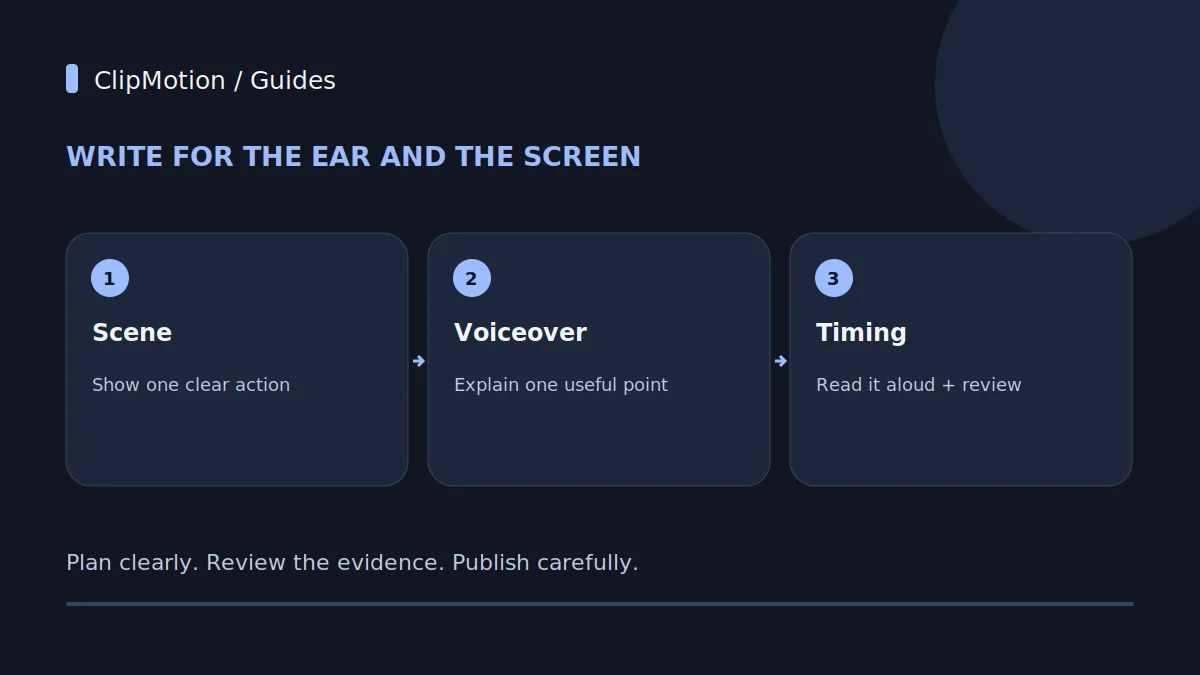
Crafting product video voiceover scripts that truly resonate and sound natural requires a fundamental shift in perspective: moving from writing for the eye to writing for the ear. This means prioritizing conversational flow, varied sentence rhythms, and clear pacing that accommodates human breath, rather than the formal structures often found in written marketing copy. A natural voiceover enhances comprehension and connection by sounding like a genuine conversation, seamlessly guiding the viewer through the visual narrative without jarring language or an overly recited tone. By understanding how speech naturally unfolds and tailoring your script to this rhythm, you create an audio experience that feels authentic and persuasive, making your product — such as an innovative insulated lunch bag — more approachable and desirable.
Use real packing footage to support statements about compartment layout and actual use. Generated scenes may illustrate the setting, but they cannot prove capacity, leak resistance or temperature retention. Match each narrated claim to product documentation or verified testing, and avoid implying that the appearance of food in a shot establishes freshness or safety.
The Fundamental Difference: Spoken Versus Written Language
The most common pitfall in voiceover scriptwriting is treating it like a written advertisement. Written copy is designed for static consumption: a reader can pause, re-read, and analyze complex sentences. Spoken language, however, is dynamic and linear. Listeners absorb information in real-time, relying on intonation, pauses, and the natural ebb and flow of speech to understand meaning. What looks compelling on paper often sounds stilted or overly formal when read aloud. Written sentences tend to be longer, more grammatically intricate, and packed with subordinate clauses, all of which can hinder natural delivery.
Consider this deliberately flawed draft for a hypothetical insulated lunch bag: "Engineered with advanced thermal regulation technology, our premium bag guarantees food preservation for eight hours." It is hard to say aloud, and it also makes performance and food-safety claims that require evidence. A rewrite should correct both problems. Try: "Pack your lunch in one place. Organize your containers, zip the bag, and carry it with you." Only introduce temperature-retention durations, leak resistance or hygiene claims when verified documentation supports the exact wording and conditions.
Crafting for the Ear: Sentence Rhythm and Flow
Natural speech is characterized by variation – in sentence length, structure, and emphasis. A script composed entirely of short, choppy sentences can sound monotonous and childish, while one filled with long, rambling clauses quickly becomes fatiguing. The key is to introduce a rhythm that mimics natural conversation. Think of how people speak: a mix of short, punchy statements, followed by slightly longer explanations, punctuated by pauses. This rhythmic diversity helps maintain listener engagement and makes the voiceover easier to process.
When drafting, read your sentences aloud. Do they flow smoothly? Do you find yourself running out of breath, or do you have natural points to pause? Avoid overly complex grammatical structures, such as multiple nested clauses or passive voice, which can sound stilted. Instead of "The lunch bag's interior, which is designed with a premium, easy-to-clean lining, provides superior thermal performance," try "Inside, our lunch bag features a premium lining that's easy to clean. And it offers superior thermal performance." The revision is simpler, more direct, and easier for a voice artist to deliver naturally, allowing for appropriate pauses and emphasis.
The Breath of Life: Pacing and Pronunciation
Effective voiceover scripts inherently account for the human element of breath. Long, unbroken sentences force a voice artist to rush, leading to a breathless, hurried delivery that undermines comprehension and sounds anything but natural. Conversely, intentionally placed shorter sentences and strategic punctuation (commas, periods, ellipses) provide crucial opportunities for a voice artist to inhale, pace themselves, and emphasize key words or phrases. When writing, read your script aloud as if you were delivering it yourself. Mark places where you instinctively take a breath. If a sentence requires you to gasp for air, it's too long. Break it down.
Pronunciation also plays a vital role. For an "insulated lunch bag," terms like "thermo-sealed insulation" or "antimicrobial lining" need to be clearly articulated. If your product has unique or technical terms, consider adding phonetic spellings or pronunciation notes directly into the script for the voice talent. This proactive step prevents mispronunciations and ensures clarity, especially when the voiceover is meant to inform.
Scripting by Scene: Synchronizing Voice with Visuals
A truly effective product video voiceover isn't a monolithic block of text; it's a carefully segmented narrative, crafted scene by scene to synchronize perfectly with the visuals. Thinking in terms of "script per scene" ensures that your voiceover directly addresses what the viewer is seeing at any given moment, reinforcing the message rather than introducing dissonance. This approach prevents situations where the voiceover talks about one feature while the visual displays another, which can confuse the audience.
ClipMotion's scene workflow is specifically designed to facilitate this process. Users plan their scenes before generating visual clips, which provides an excellent framework for integrating voiceover. First, define the visual action for each scene: perhaps the lunch bag being packed, then being carried, then opened to reveal fresh food. Only once these visual beats are established should you write the corresponding voiceover segment. Each segment should be concise, directly relevant to the visual, and propel the narrative forward.
The Silent Audience: Visuals Lead, Voice Reinforces
In product videos, the visuals are paramount. Your audience is watching, not just listening. The voiceover's primary role is to enhance, clarify, and persuade, but rarely to provide a verbose description of everything already evident on screen. Think of the voiceover as a knowledgeable guide, highlighting key benefits or unseen features, rather than a narrator meticulously describing every visual detail. For an insulated lunch bag, a shot of someone easily zipping the bag closed doesn't need the voiceover to say, "The user is now closing the zipper." Instead, it might say, "A smooth, durable zipper keeps everything securely inside," letting the visual demonstrate the ease of use while the voiceover adds a layer of benefit.
Authentic photographs, screen recordings, or actual footage are often preferable for showcasing texture, real-world use, or unique details that generic AI-generated visuals might not convey with full fidelity.
Voice and Music Balance: The Audio Landscape
A product video's audio landscape comprises more than just the voiceover; it includes background music, potential sound effects, and ambient noises. A truly natural-sounding script accounts for this holistic audio environment, ensuring the voiceover doesn't fight for attention but rather integrates harmoniously. The goal is clarity and impact. If your background music is too prominent, even the best voiceover will be lost. Conversely, if the voiceover is overly dense with information, there’s no space for music to establish mood or for sound effects to punctuate key moments.
When writing, consider the pacing. Are there moments where the voiceover can pause, allowing a musical swell to emphasize a product reveal, or a crisp "snap" sound effect to highlight a secure closure mechanism on the insulated lunch bag? Build these spaces into your script. Indicate where music should soften or where specific sound effects (like a gentle rustle of fabric or the subtle clink of ice in a bottle) might enhance the visual.
Voice Rights and Talent Considerations
While ClipMotion focuses on the visual generation aspects of your product video, the selection and management of voice talent are critical considerations that directly impact how natural your script sounds. Voice rights dictate how and where a voiceover can be used, and for how long. Engaging a professional voice artist usually involves licensing fees that vary based on usage, geography, and duration. It's crucial to clarify these terms upfront to avoid future legal or financial complications.
Beyond legalities, the choice of voice talent profoundly influences perception. A voice that is warm, clear, and articulate can make even technical explanations feel approachable. When writing your script, consider the tone and style you want to convey. Do you need an energetic, enthusiastic voice for a vibrant new feature of the insulated lunch bag, or a calm, reassuring tone to highlight its reliability? Include brief direction notes in your script for the voice artist (e.g., "[Warm and friendly tone]," "[Emphatic]").
Worked Example 1: Initial Draft (Hypothetical Insulated Lunch Bag)
Here’s an initial, hypothetical voiceover script for an insulated lunch bag, written without prioritizing natural spoken delivery. Notice its formal tone and potentially awkward phrasing.
Product: [Hypothetical] "Everest Peak" Insulated Lunch Bag
Target Audience: Professionals seeking premium food preservation.
Scene 1: [Visual: Elegant lunch bag prominently displayed on a clean kitchen counter, next to fresh ingredients.] Voiceover: "Introducing the Everest Peak Insulated Lunch Bag, meticulously engineered for the discerning individual who prioritizes optimal nutritional intake and sustained freshness throughout their demanding workday."
Scene 2: [Visual: User placing a bento box and a water bottle inside, showcasing interior space.] Voiceover: "Its capacious interior compartment, intelligently designed, accommodates various container sizes. The robust, easy-clean liner guarantees hygienic conditions while providing superior thermal retention capabilities."
Scene 3: [Visual: Close-up of the zipper, then a handle. User picking up the bag.] Voiceover: "The heavy-duty, reinforced zipper system ensures an impenetrable seal, preventing leakage and maintaining internal temperature stability. Its ergonomic handle, constructed from durable materials, facilitates comfortable transportation."
Scene 4: [Visual: User opening the bag at an office desk; food inside looks fresh.] Voiceover: "Experience unparalleled food preservation, as proprietary multi-layer insulation technology maintains desired temperatures for an extended period, ensuring that your culinary creations remain palatable and safe until consumed."
Worked Example 2: Revised and Natural Script
Now, let's revise the previous script for the hypothetical "Everest Peak" Insulated Lunch Bag, applying the principles of natural, spoken language, scene synchronization, and a focus on benefits.
Product: [Hypothetical] "Everest Peak" Insulated Lunch Bag
Target Audience: Professionals seeking premium food preservation.
Scene 1: [Visual: Lunch bag on a kitchen counter beside the containers used for this example.] Voiceover: "Give your packed lunch a place of its own. Meet the Everest Peak lunch bag: organize, zip, and carry."
Scene 2: [Visual: User effortlessly placing a bento box, an apple, and a water bottle inside the bag, showing ample, organized space. A quick shot of the smooth, wipeable interior.] Voiceover: "Plenty of room inside for everything you need. Our smart interior keeps things organized, and it’s super easy to wipe clean after any little spill."
Scene 3: [Visual: Close-up of the smooth, robust zipper being closed.
Scene 4: [Visual: User at an office desk, opening the bag.
Scene 5: [Visual: Lunch bag resting stylishly on a picnic table in an urban park.
Acceptance Criteria for a Natural Voiceover Script
Evaluating your script is a critical step in ensuring its effectiveness. A good voiceover script isn't just about what you say, but how it sounds. Use these criteria to scrutinize your work, ideally by reading it aloud to yourself or having someone else read it.
- Does it sound like a person speaking naturally? The ultimate test. Is it conversational, or does it sound like an essay being recited? Look for varied sentence lengths, natural pauses, and a lack of overly formal or academic language.
- Is it easy to read aloud without stumbling or gasping for breath? If you (or a voice artist) consistently trip over words or run out of air, the sentences are too long or poorly structured for spoken delivery.
- Does the rhythm and pacing feel engaging, not monotonous? Listen for a natural ebb and flow. Avoid repetitive sentence structures or a relentless pace that offers no auditory breaks.
- Does it align perfectly with your planned visuals? Each voiceover segment should enhance what's seen on screen, not describe it redundantly or introduce conflicting information.
Final Checklist
- Read Aloud Test: Have I read the entire script aloud? Does it sound natural and conversational?
- Breath & Pacing: Are there natural points for breathing? Are sentences varied in length to avoid monotony or breathlessness?
- Visual Synchronization: Does each voiceover segment directly correspond to and enhance its accompanying visual scene?
- Clarity & Simplicity: Is the language clear, concise, and free of unnecessary jargon or overly complex structures?
- Benefit-Driven: Does the script highlight product benefits more than just features?
- Tone & Emotion: Does the script consistently convey the desired brand tone and emotional impact?
- Audio Space: Are there deliberate pauses or less dense sections to allow for music or sound effects?
- Pronunciation Notes: Have I included pronunciation guides for any unusual or technical terms?
- Call to Action: Is the final call to action clear, compelling, and integrated naturally into the script?
- Hypothetical Labeling: Are all invented examples clearly labeled as hypothetical?
FAQ
Q1: How do I balance conciseness with providing enough information in a natural-sounding way? A1: The key lies in prioritizing. Focus your voiceover on the most impactful benefits and emotional connections. Let your visuals do the heavy lifting for demonstrating features. Instead of listing every material used in your insulated lunch bag, for example, show a close-up of a high-quality fabric, and let the voiceover say, "Premium materials, built to last." Use active verbs and direct language.
Q2: What if my product is highly technical? How do I make technical details sound natural? A2: Translate the documented feature into a clear description without adding a stronger claim. For example: "An insulated lining surrounds the container compartment." If you discuss temperature retention, use the verified duration and test conditions; never turn a material description into a promise of food safety. Break complex ideas into short sentences and let genuine footage show the construction. Clarity and evidence matter more than a dramatic benefit.
Q3: Can I use AI-generated voices for my voiceover? How does that impact script naturalness? A3: AI-generated voices have advanced significantly, but they still vary in their ability to convey nuanced emotion and natural pacing. When using AI voices, your script's naturalness becomes even more critical. AI voices often struggle with overly long sentences, complex structures, and ambiguous pauses. You'll need to be exceptionally precise with punctuation and pacing cues, even more so than for a human actor, to guide the AI's delivery.
Q4: How important is it to match the voiceover tone to the visual style of the video? A4: Matching the voiceover tone to the visual style is critically important for creating a cohesive and professional video. If your ClipMotion visual scenes are sleek and modern, a friendly, casual voiceover might fit. If the visuals are bright and energetic, an enthusiastic, upbeat voice is appropriate. A mismatch can create cognitive dissonance for the viewer, making the video feel disjointed.