AI Furniture Video Marketing: Create Cinematic Ads That Keep the Product Recognizable
Plan furniture scenes, scale, lighting and careful motion for a polished ecommerce campaign.
By the ClipMotion team · · 2,422 words · 12 min read
A ClipMotion brand guide written with AI assistance. Worked examples are hypothetical and do not represent measured customer results.
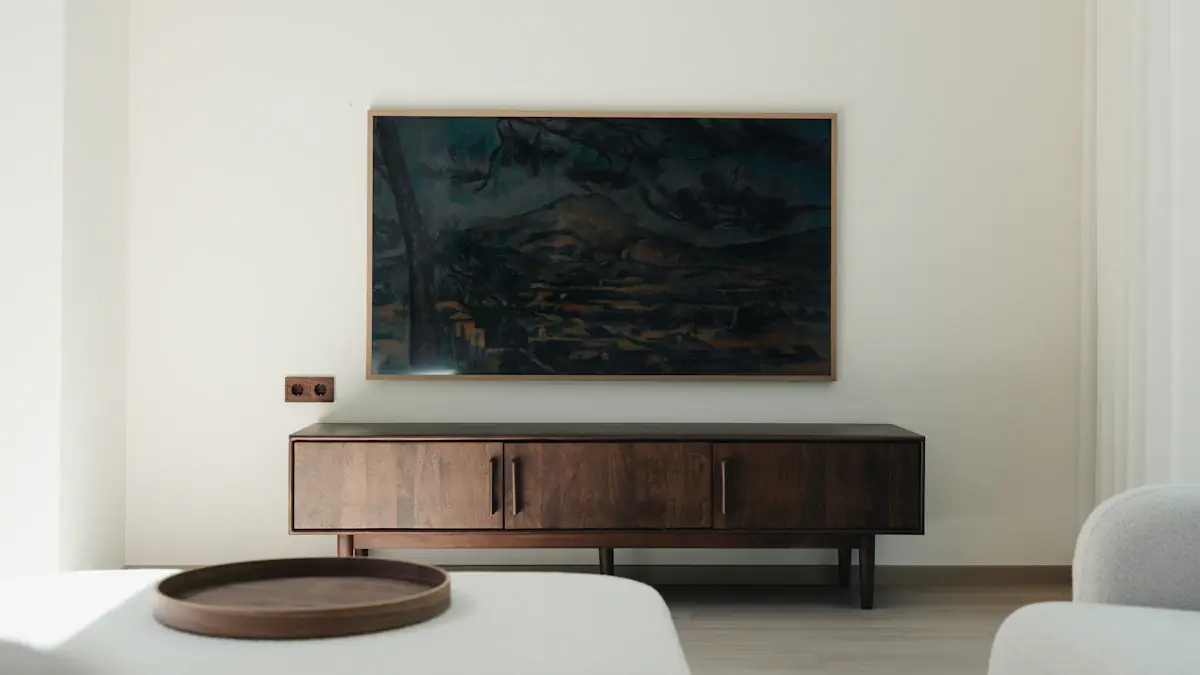
AI furniture video marketing succeeds when viewers can identify the exact product being sold, not just admire a beautiful room. The rectangular walnut console table you spent months designing must remain visually traceable from opening frame to final call-to-action. This guide shows how to build cinematic furniture ads that preserve product integrity through deliberate dimensional honesty, geometric clarity, and spatial logic—using a hypothetical campaign for that walnut console table as a running example, and ClipMotion's scene workflow as one practical path from concept to finished composition.
Dimensions should come from measured specifications and authentic scale photography. AI may distort both the console table and nearby props, so a generated tablet or mug is not a measurement tool. Use real photographs or footage when showing clearance or usable surface area; treat generated room styling as an illustration and check every visible feature against the furniture reference.
Why Product Recognition Matters More Than Atmosphere
Atmospheric furniture ads often fail at their primary job. A viewer remembers the mood—the golden afternoon light, the trailing houseplant, the abstract sculpture—but cannot describe what was for sale. For manufacturers and direct-to-consumer brands, this is expensive failure. The rectangular walnut console table must survive as a distinct object in memory, not dissolve into generic "nice furniture" impression.
Product recognition depends on consistent visual anchors. Real dimensions ground the object in believable space. Geometric silhouette provides instant pattern-matching for viewers scrolling quickly. Leg count, material grain direction, and finish sheen offer verification details for interested shoppers comparing options. Without these anchors, even a stunning video becomes a missed connection.
The hypothetical walnut console table we follow measures 52 inches wide, 14 inches deep, 30 inches tall. It has four tapered legs, not a plinth base. The walnut shows straight grain with occasional figuring, finished in low-luster oil rather than high-gloss lacquer. These specifics are not creative constraints—they are the creative brief. Every scene decision flows from protecting this information.
Establishing Dimensional Honesty
Furniture marketing has a truth problem. AI-generated and traditionally produced content alike stretch credulity: sofas too deep for real doorways, dining tables floating in impossible great rooms, proportions that would require custom architecture. Dimensional honesty builds trust and reduces returns.
For the hypothetical console table campaign, dimensional honesty means showing the 14-inch depth explicitly. A scene places the table against a standard 36-inch hallway wall, with a 24-inch runner leaving visible floor space on either side. Another shows the table behind a sofa, the 30-inch height clearing typical 28-inch sofa backs by a measurable margin. These are not boring specifications; they are storytelling tools that prove the product fits real lives.
ClipMotion's scene workflow helps plan these dimensional proofs before any visual generation begins. The creative team documents the spatial relationship—console table, hallway, runner—outside the tool, then supplies accurate product references and describes the intended composition. LTX 2.5 generates the visual scene with these constraints as context. The result is not guaranteed perfect; visual fidelity must be reviewed against the source references. But the planning stage prevents the more common error: generating beautiful footage of a table that has subtly grown to 60 inches wide and lost its distinguishing shallow depth.
Geometric Silhouette as Brand Signature
The outline of furniture against its background is often the first and sometimes only thing a viewer processes. The hypothetical walnut console table has a distinctive silhouette: long horizontal rectangle, four vertical elements at corners, slight taper narrowing toward the floor. This shape must remain legible across scenes and formats.
Silhouette preservation requires intentional framing. Against a light wall, the table's dark walnut mass reads clearly. Against a window, backlighting risks losing the leg outline in bloom. The campaign's opening scene shows the table in three-quarter view against a pale plaster wall, the full rectangle visible, legs casting distinct shadows that confirm their count and angle.
A worked hypothetical example demonstrates silhouette failure and recovery. In a planned dining room scene, the console table appears behind a tall floral arrangement. The flowers obscure the tabletop edge; the table becomes a dark blur between blooms and sideboard. The fix: lower the arrangement to 18 inches, revealing the full 30-inch height; shift camera angle to show one short end, confirming the 14-inch depth; let the walnut grain catch window light to re-establish material identity. The revised scene passes silhouette inspection. The original would have failed.
Material and Finish: Visible Truth
Walnut is not generic brown wood. The hypothetical console table's straight grain with occasional figuring is a selection choice that commands price positioning. Video must convey this accurately, not substitute a richer, more uniform grain that sets false expectations.
Material communication uses specific lighting and camera behavior. Raking light across the tabletop reveals grain direction and figuring location. A slow pan at consistent angle lets viewers track surface consistency. The low-luster oil finish responds differently to light than high-gloss lacquer would; specular highlights are softer, more diffuse, and this must be true in generated footage.
A second worked hypothetical example addresses finish misrepresentation. An initial scene generates with semi-gloss reflection that suggests lacquer. The table looks more expensive, more formal, more like competitors' products at higher price points—but it is not the product. The fix in ClipMotion requires checking whether the prior clip remains valid after adjusting the reference to emphasize oil-finish matte quality. A changed visual context demands this verification. The regenerated scene must be reviewed again. Accept it only if the apparent finish matches the reference, rather than assuming a revised prompt has resolved the mismatch.
Apartment Composition: Real Rooms, Real Logic
The hypothetical campaign targets urban apartment dwellers. This is not merely demographic labeling; it dictates spatial logic. A 52-inch console table in a 400-square-foot studio operates differently than in a suburban foyer. The campaign shows real placement possibilities without requiring impossible architecture.
Scene one: entry hallway, 42 inches wide, table centered with 6-inch clearance on each side. A mirror above, proportioned to the 52-inch width, not a generic oversized piece. Scene two: behind a 78-inch sofa in a 12-foot living room, the table leaving adequate passage. Scene three: bedroom as dressing table, a 24-inch stool tucking under the 30-inch height with ergonomic logic. Each placement is commercially useful because it is spatially possible.
The scene workflow in ClipMotion plans these compositions as distinct beats before generation. Users write their exact message for each placement context—"Fits your hallway," "Completes your living room," "Serves your morning routine"—then supply the same product references with adjusted contextual images. Some stores block product import and require direct uploads; the campaign prepares both pathways. The resulting scenes share a recognizable table across legitimately varied apartment lives.
Scale Anchors: Objects That Confirm Size
Viewers lack intuitive scale for furniture in isolation. The hypothetical console table's 14-inch depth is meaningless without reference. Scale anchors—objects of universally understood dimension placed in deliberate relationship—solve this.
The campaign uses consistent anchors. A standard 12.9-inch tablet lies on the table, its edges parallel to the table's depth, visually confirming the 14-inch measurement. A 16-ounce ceramic mug, approximately 4 inches diameter, sits beside it, the two objects together suggesting usable surface. In hallway scenes, a 24-inch runner extends the table's length, the proportion revealing the 52-inch width. These are not accidental set dressing; they are measurement tools made visible.
Scale anchors fail when they are themselves ambiguous. A "large" book, an "oversized" vase, a "generous" plant—these modifiers conceal rather than reveal. The campaign specifies: 9-by-12-inch hardcover, 8-inch cylinder vase, 6-inch pot diameter. Each anchor is chosen for dimensional certainty, then verified in generated footage against product references.
The Hypothetical Campaign: Scene by Scene
The complete hypothetical campaign for the rectangular walnut console table comprises six planned scenes, each with distinct product recognition strategy.
Scene one, "Arrival": hallway placement, three-quarter view, morning light from adjacent room. Scale anchor: 24-inch runner, 12-inch wall clock above. Message: "52 inches of welcome." Product recognition through silhouette against pale wall, leg shadows on wood floor.
Scene two, "Living": behind sofa, camera at seated eye level. Scale anchor: 78-inch sofa back, 28-inch height visible. Message: "The room's second thought, finished right." Product recognition through grain continuity with scene one, identical leg taper.
Scene three, "Working": as desk, laptop centered, 14-inch depth showing as adequate but not generous workspace. Scale anchor: 13-inch laptop, 4-inch mug. Message: "Depth that fits real apartments." Product recognition through end-view showing four legs, confirming no hidden support.
Scene four, "Dressing": bedroom, stool tucked under, mirror leaning behind. Scale anchor: 24-inch stool height, 30-inch table clearance. Message: "Morning routine, elevated." Product recognition through material match, grain figuring in consistent location.
Scene five, "Detail": raking light across tabletop, 10-second slow pan. No message text; product speaks. Recognition through material specificity, finish behavior, construction evidence.
Scene six, "Context": rapid montage of prior placements, final frame with logo and CTA. Remotion adds exact text, logo, and call-to-action in final composition. The visual clips, reviewed and still valid, require no regeneration for this overlay.
Specific Mistakes and Their Fixes
Mistake one: depth collapse. Generated footage shows the table from front elevation only; the 14-inch depth becomes invisible, indistinguishable from deeper competitors. Fix: mandate at least one three-quarter or end view in every multi-scene campaign.
Mistake two: leg absorption. Dark floor, dark legs, shadow pooling—four legs become two, or appear as a solid panel. Fix: require visible floor contrast or directional light that separates leg from ground in at least one scene.
Mistake three: grain substitution. AI generation replaces straight walnut with more dramatic figured pattern, or conversely flattens figuring to uniformity. Fix: direct upload of multiple grain detail references; review visual fidelity against source; regenerate if changed reference invalidates prior clip.
Mistake four: scale drift. Anchors shrink or grow relative to table; the 12-inch tablet becomes 10-inch or 14-inch, corrupting dimensional communication. Fix: specify anchor dimensions in scene planning; verify proportions in generated output; reject scenes where anchor-table relationship contradicts known measurements.
Mistake five: impossible placement. Table in room with 20-foot ceilings, suburban scale in apartment-targeted campaign. Fix: contextual reference images showing real target architecture; plan scenes before generation to enforce spatial logic.
Acceptance Criteria for Generated Scenes
Before any scene enters final composition, it must pass these criteria:
Product silhouette is legible in at least one frame without text overlay. Four legs are distinguishable or their absence is explainable by justified camera angle, not obscured by careless composition. Width-to-depth ratio visually approximates 52:14, approximately 3.7:1, not approaching square. Grain direction and figuring density match reference uploads within reasonable generative variation. Finish sheen responds to light sources consistently with oil-finish behavior, not lacquer or synthetic. Scale anchors confirm rather than contradict stated dimensions. Room architecture is consistent with apartment-scale reality for target demographic. Placement logic would survive viewer's own spatial reasoning; no "how did they get that in there" reaction.
Scenes that fail criteria are not "fixed" in post-composition. Editing overlay copy in ClipMotion does not require regenerating a still-valid visual clip, but a changed reference or visual context requires checking whether prior clips remain valid. Failed scenes are replanned, references adjusted, and regenerated. Projects are saved. Maintain your own version notes for approved references, rejected clips and subsequent changes.
When Authentic Photography Remains Preferable
AI video generation is a production path, not a universal replacement. Authentic photographs, screen recordings, or footage remain preferable in specific circumstances.
When grain figuring is highly variable between individual units, authentic photography of the actual inventory unit prevents mismatch expectation. When finish is truly unique—live edge, bookmatched pair, specific burl—generated generalization loses selling specificity. When construction details are proprietary or technically distinctive, authentic footage proves claims that generation might approximate incorrectly. When the brand narrative depends on workshop, maker, or material sourcing story, authentic documentary footage carries authenticity that generated scenes cannot replicate.
The hypothetical walnut console table campaign uses generated scenes for placement variety and apartment context efficiency. A parallel authentic photograph set captures the actual table's specific grain figuring for product detail pages. The video campaign directs to these verified images for purchase consideration. This division respects each medium's strength.
Final Checklist
Before launching any furniture video campaign:
- Verify all stated dimensions appear in at least one scene through scale anchor or direct visual evidence
- Confirm geometric silhouette is legible in opening frame and at least two additional scenes
- Count legs explicitly or justify intentional obscurity
- Match material grain and finish behavior to product references
- Validate every room placement against real architecture for target demographic
- Review visual fidelity of generated scenes against source references
- Check that changed references or contexts have not invalidated prior clips
- Prepare authentic photography for purchase-stage detail verification
- Write exact overlay messages before final composition
- Save project iterations
Frequently Asked Questions
How do I prevent AI-generated furniture from subtly changing proportions between scenes?
Consistent product references are primary control. Upload multiple angles of the actual product with visible measurements. Plan scenes explicitly in the scene workflow before generation, specifying camera angle and spatial relationship. Review each generated scene against references before accepting; reject scenes where proportions drift. The rectangular walnut console table's 52/14/30 dimensions should be visually recoverable from every accepted scene.
Can I update text in my video without regenerating the visual clips?
Yes, when the visual clips remain valid. In ClipMotion, editing overlay copy—headlines, calls-to-action, promotional messaging—does not require regenerating still-valid visual clips. Remotion handles exact text, logo, and CTA in final composition. However, if your text change implies a different visual context—"Now in oak" when clips show walnut—you must check whether prior clips remain valid and likely regenerate.
What should I do when a store blocks automatic product import?
Direct uploads are the prepared alternative. Some stores block import and require direct uploads of product images. Maintain a folder of high-resolution, well-lit product photography from standard angles for this purpose. The hypothetical console table campaign keeps front, three-quarter, end, detail grain, and leg profile images ready for direct upload when needed.
How do I choose between AI-generated video and authentic photography for my campaign?
Use generated video for placement variety, spatial context, and efficient production of multiple scenes showing the product in different settings. Use authentic photography when specific unit variation matters, when construction or material claims require documentary proof, or when brand narrative depends on actual workshop or sourcing footage. Most effective campaigns combine both, with generated video driving discovery and authentic imagery closing consideration.
Ready to plan your own furniture video campaign? Start a project in ClipMotion, choose a template that matches your product's spatial logic, and use the scene workflow to protect what makes your piece recognizable before a single frame generates.